When you convert an HTML file or a ZIP into an app, the files are copied into the APK and served from the device. Nothing is fetched from the internet, so the app opens instantly and works with no connection at all. The price is that the app is only as current as the last build, and that your files must obey a few rules that a web server used to quietly handle for you.
What goes in the ZIP
A static site, as you would upload it to any host: an index.html at the top level, with the CSS, JavaScript, images and fonts alongside it in whatever folders you like. A single HTML file is the degenerate case — everything inline, no folders, and nothing can go wrong with paths.
my-site.zip
├── index.html        ← must be here, not inside a folder
├── about.html
├── css/style.css
├── js/app.js
├── img/logo.png
└── fonts/inter.woff2
The most common ZIP mistake is zipping the folder instead of its contents, which puts index.html one level down at my-site/index.html. The app then has no page to open. On a Mac, select the files inside the folder and compress those; on Windows, open the folder first and then "Send to → Compressed folder" from inside it.
Rule 1 — Relative paths only
There is no web server inside an app, so a path that starts with / has no root to resolve against. /css/style.css works on your host and fails in the app; css/style.css works in both. The same goes for anything absolute to your computer (C:\Users\... or file:///Users/...), which your editor may have written for you. Site builders and static-site generators usually have a "relative URLs" or "base path" setting; set it to relative before you export.
Rule 2 — No ES modules
<script type="module"> is blocked on bundled pages. Browsers treat every file:// page as its own origin and refuse cross-origin module loads, which means your JavaScript silently never runs and the app opens to a blank white screen. Frameworks built with Vite, and many modern templates, emit module scripts by default. The fix is a build setting — Vite's build.modulePreload and @vitejs/plugin-legacy, or a bundler configured for a classic script — not a change to your code.
The same origin rule blocks fetch() of local files and service workers. Read data by embedding it in a script tag instead of fetching a JSON file.
Rule 3 — Everything included, and lowercase
A font, script or stylesheet loaded from a CDN is a blank space when the phone is offline. Download them into the project. And Android's filesystem is case-sensitive where Windows and macOS are not: Logo.PNG and logo.png are different files, so a reference that works on your laptop can 404 in the app. Lowercase everything and you never think about it again.
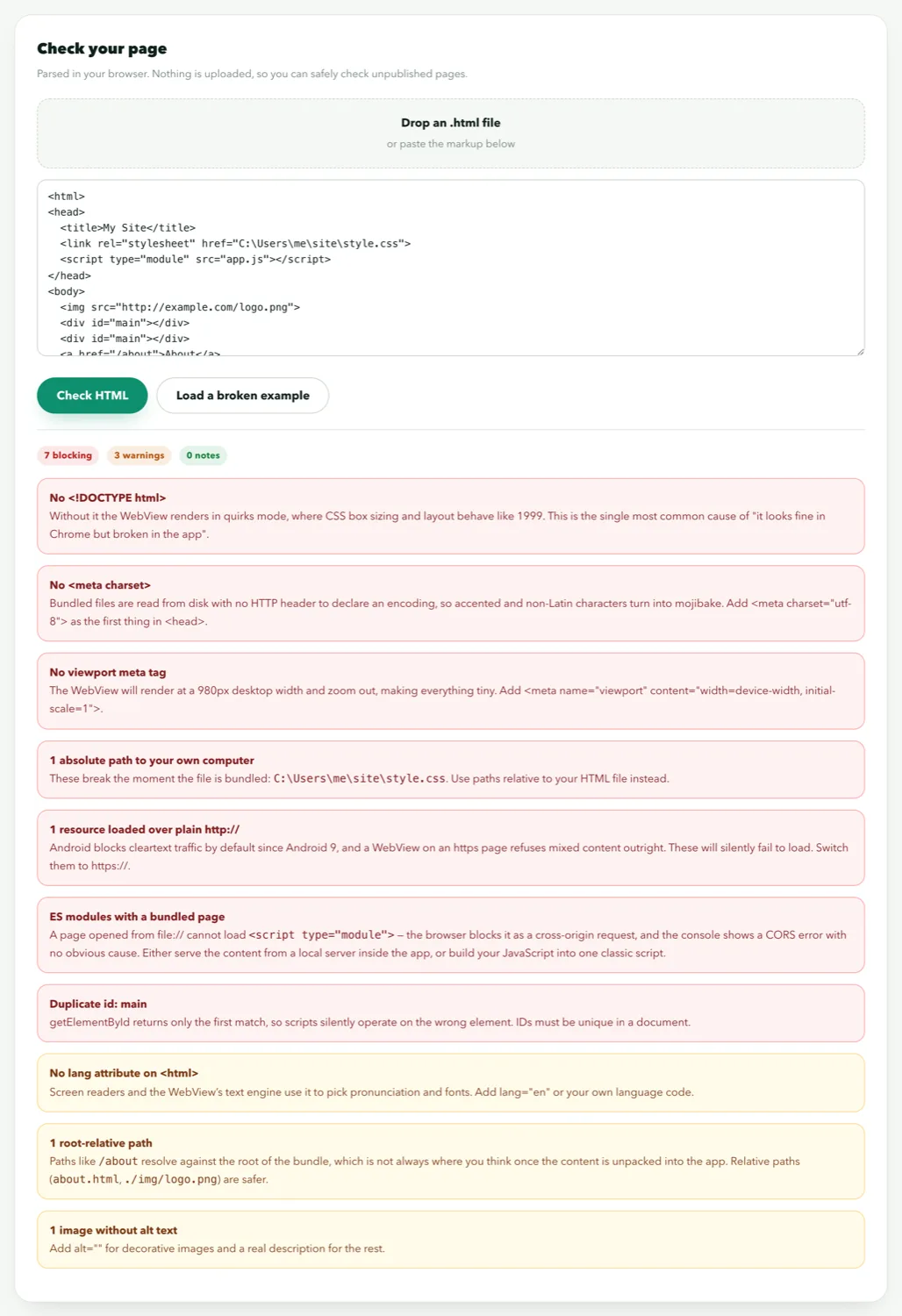
All three rules are checked by the validator, in your browser, without uploading the file:
Size limits and what to trim
Free accounts can upload up to 5 MB of content; Pro raises it to 18 MB. The limit is on your source files, not the finished app — text compresses to roughly a quarter of its size inside the package, while images and video do not compress at all. Before zipping, remove node_modules, source maps, .git folders, Photoshop files and unused images: everything in the ZIP ships inside the app and can be extracted by anyone who installs it. Convert large PNGs to WebP; it is typically a 60–80% saving.
What single-page apps need
A React, Vue or Svelte app with client-side routing works in a bundle if it uses hash routing (#/about) rather than history routing (/about). History routing relies on a server that returns index.html for every path, and there is no server. Most routers have a one-line switch. Build for production, confirm the output has no module scripts, then zip the dist folder's contents.
Pre-flight checklist
index.htmlis at the root of the ZIP- Every path is relative; no leading
/, no drive letters - No
<script type="module">; nofetch()of local files - Fonts, scripts and styles are in the ZIP, not on a CDN
- All filenames lowercase; references match exactly
- The page has a
<!DOCTYPE html>and a viewport meta tag - Under 5 MB (free) or 18 MB (Pro), with build junk removed
Pass those and the bundled app will open on the first build. If it still shows a blank screen, the fixes guide works through the remaining causes.